|
home gallery |
| projects philosophy faq | |
 |
free plans: how to make a Perpetual Calendar |
| Basic Description |
This is an amazing calendar that remains functional for thousands of years. We have three versions: the first is an online version intended for online viewing and printing of selected pages. The year-at-a-glance version uses fourteen ordinary sheets of paper and extends from the year 1600 to 10000. Our favorite is the monthly version that spans 2800 years and fits on 28 sheets of paper. If you used traditional wall calendars during that period, you would need at least 30,000 sheets of paper! Don't worry these aren't microscopic: the pages are full-size. |
| Materials | Paper |
| Tools | Acrobat Reader, computer printer |
| Cost | The plan itself is free! Estimated materials cost: $1 - $2 |
| Time | Fifteen minutes to make but it lasts virtually forever. |
| Difficulty | Easy |
| Legal Notice | Use of this website constitutes acceptance of our terms of service policy. |

First you need to decide which calendar you want to make. If you simply want to view a particular month in the past (as early as 1600) or the future (up to the year 10000), you can visit the online perpetual calendar; you can view or print individual months or years during this 8400 year span. This is perfect for looking at the day of the week you were born or looking out into the distant future. If you choose the online version, you can skip the following steps, but you may be interested some background information that we have provided at the end of this project. |
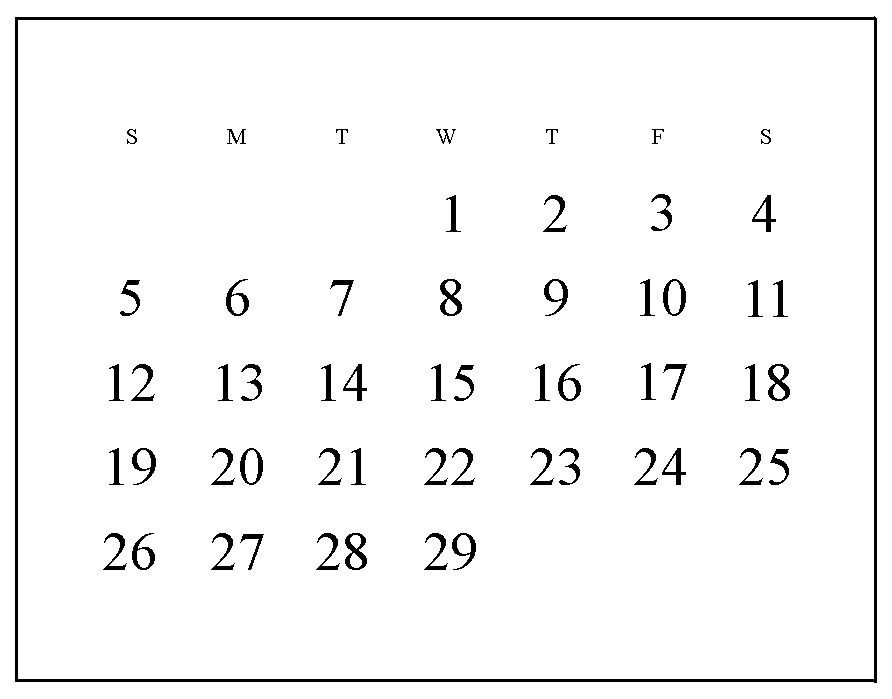 |
If you would like a printed copy of a perpetual calendar then you can choose between the monthly or yearly view. The monthly view requires 28 sheets of paper to be printed on both sides. The yearly-view requires 14 printed sheets: it has the twelve months of a given year on individual pages. You can click on the icons on the right to view larger samples. Our perpetual calendar doesn't come with any photographs or paintings like the wall calendars that most of us are used to. To make up for this seeming need for images along with calendar information, we have provided some of our recent vacation photos below. Its not clear why calendars became associated with image display, but we think that if you want images to decorate your room, you can get some images (perhaps framed) and display them wherever and whenever you want. Perhaps the novelty of having new photos each month was the impetus for the idea to link calendars with images, but what about those months when you don't particularly enjoy the image: you may want to have a different photo but then you lose the month. It seems to make the most sense to have a calendar that specializes in what it does (display dates) and have images that specialize what they do (beautify a room, remind you of a past moment etc.); you can rotate your wall hangings whenever you want. Since many months share the same view in the month-at-a-glance version, none of them have the month names written on them. If this is an important feature, you may want to make a wall holder for the perpetual calendar which has a provision for month names. |

|
Now you need to test the printing of the calendar of your choice. We are providing this test to ensure that the acrobat files are printing properly on your system and to show you how to orient the pages properly in your printer. To do this, you will need the Acrobat Reader installed on your computer. If you do not have the reader, you will need to install the free program before proceeding. We offer each calendar in two paper sizes (letter and A4). Each paper size has two files, one for the fronts of the page and one for the backs. After printing one side of the paper, you will need to place the paper the opposite way into your printer, but make sure that top of the printed side is closer to the printer. |
 |
Letter paper:
A4 paper:
If you are having any difficulties with the download or printout, you should visit the Acrobat troubleshooting page. Make sure that you didn't print the two files on the same side of the paper. If so, you need to flip the sheet over before printing the back side. Now, look at both sides of the sheet: the orientation arrows should be pointing in the same direction. Also check the quality of the print. The numbers should be crisp and the background should be white. If the orientation matches and the print looks good, make a mental note of how you oriented the paper into the printer and you're ready to move on.
Now lets print the calendars. Again, each calendar has two files: one for the fronts and one for the backs. After printing the fronts of the set, then you take the stack and print out the back sides--orienting the stack in the same way that you did during the test. Note that the monthly view requires 28 sheets of paper, and the yearly view requires 14 sheets. A note about materials. You are about to print a calendar that will be functional for thousands of years. The pages will be handled frequently so we recommend that you opt for the best quality and durable paper that you can find. Heavy acid-free or archival-quality paper is probably the best bet, but of course any paper you choose will work. Laser and ink-jet printers have not been around long enough to determine the longevity of prints. While the ink may fade after a significant number of years, we reckon that the calendars will be readable for a sufficient period of time. |
 |
Letter paper:
A4 paper:
Next, you need to learn how to use the calendars. The year at a glance calendar is quite easy to use. Each calendar has a letter key on the back ranging from A to N. Simply find the year in question on the reverse of the calendars to find which letter a given year is associated with. The year 2000, for example is associated with calendar N, so the appropriate yearly calendar for the year 2000 is on the reverse of the page with the letter N. The monthly perpetual calendar is equally easy to use. The months are keyed with numbers instead of letters from 1 to 28. Find the year that you are interested in and locate the number associated with the month in question. For example, January of the year 2000 is associated with calendar number 7; therefore the reverse side represents January 2000. |
 |
Background information: The idea for a perpetual calendar first occurred to me when I realized that there are only a limited number of potential layouts for a calendar month. It turns out that we at UNIQUEPROJECTS did not invent the perpetual calendar, but the process of figuring it all out was enjoyable nonetheless. A month can either have 28, 29, 30, or 31 days. (Februarys always have 28 days unless its a leap year in which case they have 29). Furthermore, each month can only start on one of seven days, Monday through Sunday. This makes a total of 28 possible monthly layouts because four (total number of possible days in a month: 28, 29,30 or 31) times seven (days on which any given month can start) equals 28. The only missing element at this point is which layout is linked to which month. We accomplished this with some tricky formulas in spreadsheet software. |
|
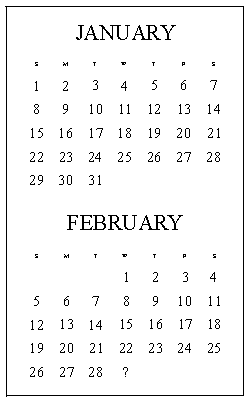
Annual calendars are slightly different. January always has 31 days but it can start on any of seven days of the week, depending on the year in question. That means that the day of the week of February first is dependent on the day of the week of the January first. For example, if January starts on a Sunday, February must start on a Wednesday. February, however, can either be 28 days or 29 days depending on whether the year in question is a leap year; see the calendar to the right. The remaining months of the year have fixed amounts of days. Therefore, January can start on any of seven days when it is a non-leap year and it can start on any of seven days when it is a leap year: this creates 14 yearly possibilities. With this established, the only requirement is to determine which years were leap years and on which day January started for a given year. |
 |
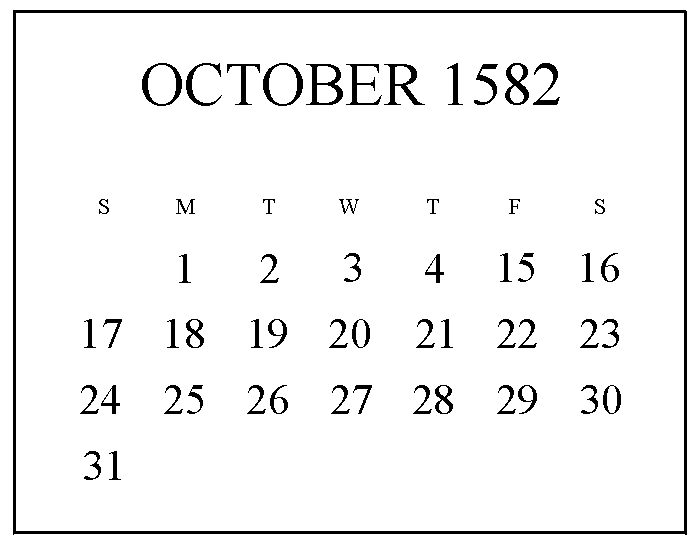
A year is not an arbitrary period of time, it is an astronomic reality; it represents the time it takes for the earth to orbit around the sun. A good calendar therefore, needs to match this period of time. It takes 365.242 days for the earth to complete the trip. Instead of adding .242 of a day (5 hours 48 minutes and 30 seconds) to a 365-day year the leap-year system was devised. Every four years an extra day was added to the 365 days in the regular calendar. This system is relatively accurate, but .242 is not exactly the .250 of a day that it needs to be for the leap-day to work perfectly. Over the centuries the .008 (.250 minus .242) of a day or 11 minutes 30 seconds began to add up. The continuing accumulation came to an end in October 1582 when Pope Gregory XIII stated that 10 days were to be removed from the calendar that month. This made for a bizarre month. You can imagine what people's schedule's looked like that month. Pope Gregory XIII, for whom the modern calendar is named after (Gregorian), also established a system to prevent the accumulation from beginning all over again. Every four years divisible by four would continue to be a leap year, but years divisible by 100 would not unless they are also divisible by 400. So the year 2000 was one of these special years that comes once every four centuries: divisible by 100 but also divisible by 400--a non-leap year. This new system is far superior to the outdated one it replaced, but its still not 100% perfect. When you do the math, there still is a minuscule accumulation and perhaps in thousands of years another day will have to be stricken from the calendar or perhaps a leap year bypassed. With your wall calendar printed, you may want to make a wall holder for it. |
|
© 2000-2008
terms privacy policy |
home gallery |
| projects philosophy faq | ||